Google Ads
Google Ads Audit Checklist: 27 Things I Check Before Touching a Campaign
The exact audit I run on every Google Ads account takeover — conversion actions, search terms, PMax, feeds, and the economics behind the bids. Use it yourself, or see what a real audit covers.

PPC & Creative Strategist
When I take over a Google Ads account, I don't change anything for the first few days. I audit.
Most wasted spend in Google Ads doesn't come from bad optimization. It comes from decisions made months ago that nobody re-checked: a conversion action counting the wrong thing, a Performance Max campaign eating branded traffic, a Shopping feed with titles Google can't match to searches.
This is the checklist I actually use. Run it on your own account before you spend another peso — or before you hire anyone (including me) to run it for you.
TL;DR
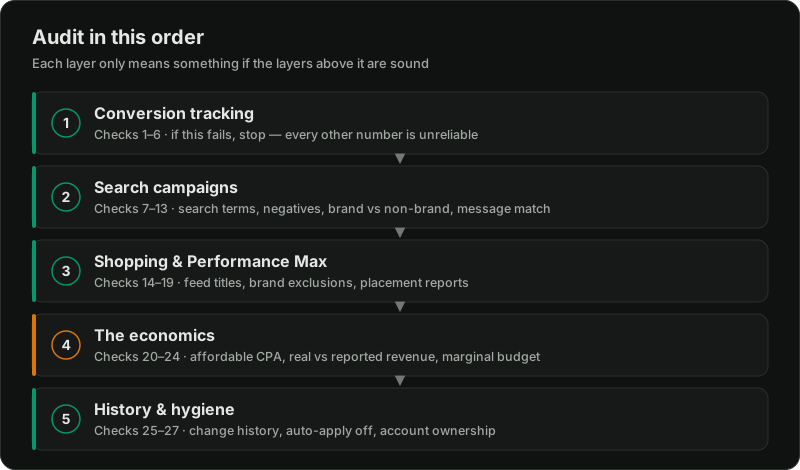
Part 1: Conversion tracking (checks 1–6)
Everything else in the account depends on this. Smart Bidding optimizes toward whatever the conversion column says — if that column is wrong, Google is efficiently buying the wrong thing.
1. What is the primary conversion action?
Open Goals → Conversions. Is the primary action a purchase, a qualified lead, a booking — or a page view, a button click, or "all web site traffic"? I've audited accounts spending six figures a month optimizing toward a thank-you page that fires on every form, including job applications.
2. Are there duplicate conversion actions?
A Google Ads tag and a GA4 import both counting purchases doubles your reported conversions and halves your reported CPA. Check the source column. One primary source per outcome.
3. Do conversion values match reality?
Pull 30 days of conversion value and compare it to actual revenue from those orders in your store or CRM. A gap over 15–20% means the values feeding tROAS bidding are fiction.
4. Are micro-conversions set as primary?
Add-to-carts, scroll events, and phone clicks belong as secondary actions. If they're primary, Google blends them into bidding and chases cheap actions instead of revenue.
5. Is enhanced conversions on and working?
Check the diagnostics tab. For lead gen especially, enhanced conversions recovers matches that cookie loss drops.
6. What's the conversion window and attribution model?
A 30-day click window on a same-day purchase product inflates credit. Know what the settings claim before trusting any ROAS number in the interface.
If tracking fails these checks, stop the audit and fix it first. I cover the full setup in Google Ads conversion tracking.
Part 2: Search campaigns (checks 7–13)
7. Read the search terms report — 90 days.
Sort by cost. The top 50 terms tell you more than any dashboard. You're looking for three buckets: terms that convert, terms that never will (jobs, free, DIY, competitors you can't win), and terms that are really research queries.
8. Check the negative keyword situation.
No shared negative list across campaigns is the most common finding on accounts under ₱500K/month spend. My full process is in negative keywords mastery.
9. Match type drift.
Broad match plus Smart Bidding can work — with clean conversion data and enough volume. Broad match with weak tracking is a donation to Google. Check what percentage of spend runs on broad and whether those terms actually relate to the keyword.
10. Brand vs non-brand separation.
If branded searches and cold searches live in the same campaign, your blended numbers look great and your cold acquisition is invisible. Separate them. Brand CPA is not acquisition CPA.
11. Ad copy vs landing page message match.
Click your own top three ads. Does the page headline repeat the promise in the ad? A mismatch here quietly raises CPC through Quality Score and kills conversion after the click.
12. Location and schedule settings.
Check "Presence or interest" vs "Presence". The default has bought me enquiries from countries a local clinic could never serve.
13. Wasted structural complexity.
Fifteen campaigns with three clicks a day each starve Smart Bidding of data. Fewer campaigns with clear jobs beat clever segmentation on most budgets. More on this in Google Ads account structure.
Part 3: Shopping and Performance Max (checks 14–19)
14. Feed titles.
Open Merchant Center. Do product titles lead with what people search — brand, product type, key attribute — or with internal SKU names? Title quality decides which auctions you even enter.
15. Feed disapprovals and warnings.
Items limited by policy or missing identifiers are invisible inventory. Check the products tab, not just the ads interface.
16. Does PMax have brand exclusions?
Without brand exclusions, Performance Max takes credit for people who searched your name. Its reported ROAS looks brilliant while contributing little that's new.
17. What do PMax placement and channel reports show?
If most PMax spend goes to remarketing your recent visitors and cheap display, "it has a great ROAS" means "it follows people who already decided." I go deeper in the Performance Max deep dive.
18. Are asset groups segmented sensibly?
One asset group for an entire catalog means one message for every product. Group by margin or category so budget follows profit, not just volume.
19. Standard Shopping vs PMax test.
Accounts that have never tested standard Shopping against PMax on the same products don't actually know which one wins. Many are surprised.
Part 4: The economics behind the account (checks 20–24)
This is the part most audits skip, and it's the part that decides everything else.
20. What can a conversion afford to cost?
Margin per order, or value per qualified lead times close rate. If nobody can answer this, every tCPA and tROAS target in the account is a guess.
21. Do platform numbers survive contact with the bank account?
Compare 90 days of Google-reported conversion value against actual attributable revenue. Some gap is normal. A 2x gap means decisions are being made on fiction.
22. Is the tROAS target set from margin or from hope?
Break-even tROAS is one divided by contribution margin: at 30% margin you need roughly 333% just to break even, so a 300% target loses money on every sale while looking perfectly respectable in the dashboard. The target has to come from the unit economics, not from what the previous manager thought sounded healthy.
23. Where is the marginal budget going?
If you added ₱50K next month, which campaign gets it and why? An account with no answer is being managed by inertia. Blended averages hide the fact that the last peso spent usually performs far worse than the first.
24. Lead quality feedback loop (lead gen accounts).
Does anyone tell Google which leads became customers, through offline conversion imports or qualified-stage tracking? Without it, Google optimizes toward form-fillers, and form-fillers are not buyers.
Part 5: History and hygiene (checks 25–27)
25. Change history — 90 days.
Tells you whether the account is being managed or just left running. Also shows whether auto-apply recommendations are on. Turn most of them off; they optimize for Google's revenue, not yours.
26. Recommendations tab skepticism.
The optimization score is not a health score. Accounts at "94% optimized" can be losing money faster than ever.
27. Access and ownership.
Do you own the Ads account, the Merchant Center, the GA4 property, and the tag setup — or does a previous agency? If you don't own the account, every peso of history is hostage. Fix this before anything else.
How to score your audit
Want a second pair of eyes on your account?
Related reading:

Written by
Vince Servidad
PPC & Creative Strategist
I manage Google Ads and Meta Ads for ecommerce, healthcare, SaaS, events and nonprofits, with creative strategy, Shopify development and conversion tracking.