Meta Ads
How to Send Qualified Lead and Booked Client Data Back to Meta Ads
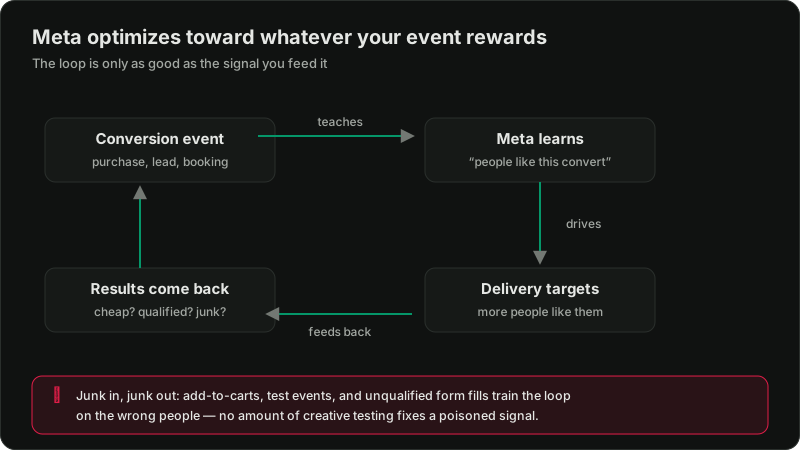
If Meta only receives raw form fills, it learns to find form fillers. This guide shows how to connect lead stages, CRM outcomes, Conversions API events, and values so delivery can learn from real clients.

PPC & Creative Strategist
Lead-generation campaigns often optimize toward the easiest event to collect: a form submission.
That is convenient for reporting and weak for learning.
Meta cannot automatically know that one lead was spam, another was outside your service area, and a third became a $4,500 client. If all three trigger the same Lead event, the system receives the same success signal.
The solution is a qualified-lead feedback loop: record what happens after the form and send the valuable stages back.
TL;DR
Meta describes Conversions API as a direct connection between data from your server, website, app, or CRM and its optimization systems. That includes later customer-journey actions and customer scores—not only website events.
Step 1: Define the stages
Use definitions sales and marketing can both apply.
| Stage | Example definition |
|---|---|
| Lead | A valid form or new inbound call |
| Qualified Lead | Correct need, location, budget, and contact |
| Opportunity | Consultation, quote, or proposal created |
| Won Client | Contract, booking, or payment confirmed |
| Client Value | Revenue, gross profit, or approved proxy value |
Do not invent stages simply to create more events. Every stage should represent a meaningful increase in commercial value.
Step 2: Decide which event should guide delivery
The deepest event is not always the best initial optimization event.
Suppose a month produces:
Won Client may be too sparse to guide every ad set. Qualified Lead may provide a stronger learning signal while Won Client remains the final reporting outcome.
Choose an event that is:
Step 3: Preserve attribution identifiers
For website leads, retain:
_fbc, which can represent the Meta click_fbp, the browser identifier created by the Meta PixelDo not place personal data in URLs. Store it securely in the lead record.
These identifiers and appropriately normalized customer information improve the chance that the CRM outcome can be matched back to the ad interaction.
Step 4: Keep Pixel and Conversions API events deduplicated
For website events sent from both the browser and server, use the same event name and event ID so Meta can recognize one action rather than count two.
Check Events Manager for:
The broader setup is covered in the Meta Pixel and Conversions API guide.
Step 5: Connect CRM stage changes
There are three practical implementation levels.
Level 1: Manual or scheduled workflow
Export recently qualified and won leads, then send events through an approved integration or controlled upload process.
Useful for proving the data model before automating it.
Level 2: Native CRM or automation connector
Use a supported CRM integration or an automation platform to trigger an event when a lead stage changes.
Map every field explicitly. Do not assume a connector's default “conversion” matches your business definition.
Level 3: Direct Conversions API integration
Your server sends the event when the CRM outcome changes.
This gives the most control over event names, values, identifiers, diagnostics, and retry behavior—but it also needs engineering ownership.
Start with the simplest method the team can operate reliably.
Step 6: Build the event payload
A later-stage event should include:
Hash required customer fields according to Meta's specifications before transmission when your integration does not handle it.
Do not send sensitive or prohibited information. Review Meta's Business Tools terms and your own privacy obligations before implementation.
Step 7: Assign values based on economics
If one qualified lead is materially more valuable, reflect it.
Example:
| Outcome | Value |
|---|---|
| Qualified lead | $75 |
| High-value qualified lead | $225 |
| Opportunity | $450 |
| Won client | Actual approved value |
Proxy values should preserve relative importance. They should not be inflated to produce attractive ROAS.
Step 8: Validate with test records
Use a controlled set of leads and confirm:
1. The original lead record contains the required identifiers.
2. A stage change triggers one event.
3. Meta receives the event.
4. The event is not duplicated.
5. Match-quality diagnostics are healthy.
6. Values and currency are correct.
7. Reporting shows the expected stage.
Do not switch campaign optimization until the pipeline is stable.
Step 9: Change optimization carefully
Compare:
It is normal for raw CPL to rise while cost per qualified lead falls. Cheap forms are not the objective.
Consolidate campaigns where needed so the chosen later-stage event has enough volume. Avoid spreading 30 qualified events across ten ad sets.
Step 10: Run a weekly quality review
Marketing brings campaign, ad, and creative data. Sales brings qualification and outcome data.
Review:
The meeting should change a creative brief, qualification rule, follow-up workflow, landing page, or budget decision.
Common implementation failures
Optimizing before the data is stable
First validate event volume, timing, and match quality.
Sales stages are subjective
Write observable criteria and audit a sample weekly.
Events arrive too late
Send outcomes as soon as the stage is confirmed. Delayed feedback is weaker feedback.
CAPI is installed but does not carry business results
Sending the same PageView, Lead, and Purchase events from a server improves connection reliability. It does not automatically create a qualified-lead loop. The CRM stages still need to be mapped.
Nobody owns failures
Assign one owner for diagnostics, one for CRM data quality, and one for campaign decisions.
A 30-day rollout
Week 1
Define stages, qualification rules, values, and data permissions.
Week 2
Capture identifiers and connect one later-stage event.
Week 3
Validate test records, deduplication, match quality, and values.
Week 4
Launch a controlled optimization test and report cost per qualified outcome.
The goal is not more tracking. The goal is better decisions and a delivery system trained on real customers.
Official reference: Meta—About Conversions API

Written by
Vince Servidad
PPC & Creative Strategist
I manage Google Ads and Meta Ads for ecommerce, healthcare, SaaS, events and nonprofits, with creative strategy, Shopify development and conversion tracking.