Shopify
Migrating to Shopify Without Losing Your Rankings
Most traffic lost in a replatform isn't lost to Shopify — it's lost to URLs that changed without redirects. The migration itself is straightforward. The SEO continuity is where stores get hurt.

PPC & Creative Strategist
I've watched stores move to Shopify and lose a third of their organic traffic overnight, then spend six months blaming the platform.
The platform was almost never the problem. Their URLs changed and nothing told Google where anything went.
Migration is a solved problem. Doing it without a traffic crater is a checklist, and the checklist has to be built *before* launch day, because the expensive mistakes are the ones you can't see until rankings have already gone.
Disclosure: the Shopify links here are affiliate links — if you start a store through one I earn a commission at no extra cost to you. This applies whether you migrate or not; I'd give the same advice either way.
TL;DR
/products/, /collections/) — so most URLs will change. Plan for it.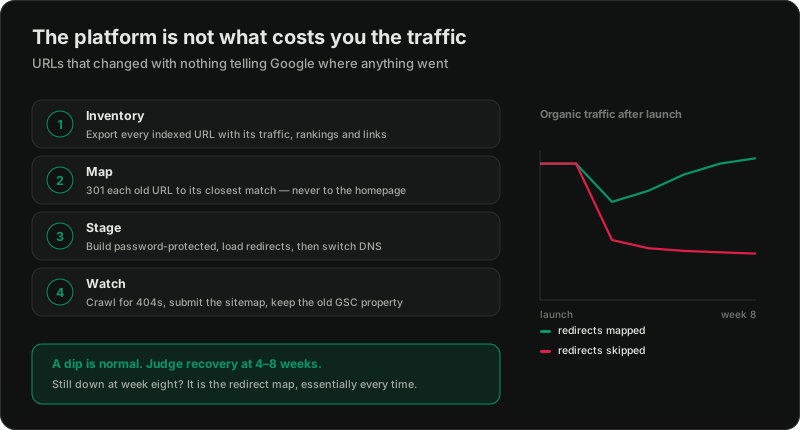
Before you move anything
Export every indexed URL with its traffic and rankings. From Search Console, your analytics, and a crawl of the current site. This is the single most important step and it cannot be done retroactively — once the old site is gone, so is the evidence of what was working.
What you want, per URL: sessions, conversions, ranking keywords, and inbound links. That tells you which pages must survive and which genuinely don't matter.
Identify the pages that actually earn. In most stores a small number of pages carry the great majority of organic value. Those get individual attention. The long tail gets pattern-based rules.
Record your current Core Web Vitals so you can tell afterwards whether you improved or regressed — speed on Shopify.
The URL structure problem
Shopify imposes a URL structure that you largely cannot change:
/products//collections//blogs/<blog>//pages/If you're coming from WooCommerce, Magento, or a custom build, your URLs almost certainly don't look like that. So they will change, and every one of them needs a redirect.
One specific trap worth knowing: Shopify can serve a product at both /products/name and /collections/x/products/name. Make sure canonical tags point to the clean /products/ version — the theme should handle it, but check rather than assume.
Build the redirect map
This is the work. Everything else is data entry.
Rule one: every old URL maps to the closest equivalent new page. Not the homepage. Redirecting a deep product page to the homepage is treated as a soft 404 and loses the value entirely — it's the most common way this goes wrong.
Rule two: 301, not 302. Permanent, not temporary. This is what passes ranking signals.
Rule three: avoid chains. Old A → new B, never A → B → C. Chains dilute and slow.
Rule four: don't forget the non-product URLs. Blog posts, category pages, old landing pages, and anything with backlinks pointing at it. These are frequently overlooked and often carry the most link equity.
Shopify has redirect handling in the admin, and bulk CSV import for large sets. For very large catalogues an app or scripted import saves real time.
Test the map before launch, not after. Take your list of old URLs and confirm each one resolves to the intended destination.
What to migrate carefully
Product data. Titles, descriptions, images with their alt text, and variants. Alt text is routinely lost in migrations and it's both an accessibility and an image-search cost.
Meta titles and descriptions. If your current ones are well-optimised, port them. Don't let a migration silently overwrite them with theme defaults.
Structured data. Product schema with price and availability drives rich results. Most decent Shopify themes handle it, but verify with a validator rather than trusting the theme description — Google Shopping setup covers the feed side.
Reviews. Frequently forgotten and genuinely painful to lose — they're both social proof and indexable content. Export from your old system before you cancel it. Reviews.
Internal links. Links in your content pointing at old URLs will now hop through redirects. Update them to point directly at the new URLs.
Launch sequence
1. Build on the Shopify staging URL, password-protected so nothing gets indexed early.
2. Load the redirect map before the domain switches.
3. Switch DNS, ideally at your lowest-traffic hour.
4. Immediately verify the new site in Search Console and submit the new sitemap.
5. Crawl the live site looking for 404s, redirect chains, and missing canonicals.
6. Keep the old site's Search Console property — you'll need it to watch the old URLs drop out cleanly.
What to expect afterwards
A dip is normal. Google has to recrawl and reprocess everything. A short decline in the first weeks does not mean the migration failed.
Recovery usually lands in four to eight weeks for a well-executed migration. Judge it then, not on day three, and resist the urge to start changing things in week one — you'll only confuse the signal.
Watch, weekly: Search Console coverage errors, 404s in your analytics, rankings on the pages you flagged as valuable, and organic sessions against the pre-migration baseline.
If traffic hasn't recovered by week eight, the cause is nearly always redirects — either missing, chained, or pointed somewhere unhelpful. Go back to the map.
The parts people skip
Cancelling the old hosting too early. Keep it until you're certain. It costs little and it's your only way back.
Forgetting paid campaigns. Every ad, sitelink, and tracking template pointing at an old URL now goes through a redirect or breaks outright. Audit the ad accounts on launch day — this one costs money immediately, unlike the SEO effects.
Not updating other properties. Email footers, social profiles, marketplace listings, invoices.
Assuming apps carry over. They don't. Rebuild subscriptions, loyalty, and reviews deliberately.
Should you migrate at all?
If your current platform works and your traffic is healthy, "everyone uses Shopify" is not a reason. Migration carries real risk and real cost.
Good reasons: your platform is genuinely holding back conversion or operations, maintenance is eating money, you need capability the current stack can't provide, or you're spending more on developers than the migration would cost.
Bad reasons: the admin looks nicer, someone on YouTube said so.
The comparison, if you're weighing it: Shopify vs WooCommerce.
If you've decided
Start the store and build it on the staging URL while the current site keeps trading. Nothing needs to go live until the redirect map is tested.
Related reading:

Written by
Vince Servidad
PPC & Creative Strategist
I manage Google Ads and Meta Ads for ecommerce, healthcare, SaaS, events and nonprofits, with creative strategy, Shopify development and conversion tracking.