Shopify
What a Shopify Store Actually Costs to Run Per Month
The plan fee is the smallest and least interesting part of the answer. Here are the five cost layers that decide what the platform really takes, and the one number you should be tracking instead.

PPC & Creative Strategist
Almost every "how much does Shopify cost" article answers the wrong question. They quote the monthly plan fee, add a line about apps, and stop.
The plan fee is the line everyone fixates on and the one that matters least once you're actually selling. What decides your platform cost is a stack of five layers, and the biggest of them scales with every peso you take — which means the honest answer isn't a peso figure at all. It's a percentage.
Disclosure: the Shopify links in this article are affiliate links. If you start a store through one I earn a commission at no extra cost to you. I build on Shopify for clients and would recommend it regardless; the link doesn't change what I'd tell you, including the parts below where I say don't bother.
TL;DR
A note on figures
Shopify's plan prices, fee percentages, and regional availability change, and they differ by country and by whether you pay monthly or annually. Every number in this article is illustrative, there to show you the shape of the arithmetic. For current rates, check Shopify's pricing page — and check it for your country, because it varies.
What doesn't change is the structure. That's the useful part, and it's what the rest of this covers.
The five layers
1. The platform plan
The headline number, and the one people fixate on. It's a fixed monthly cost, which means it matters enormously at ₱50,000/month in sales and barely at all at ₱2,000,000.
Annual billing is usually discounted meaningfully. Worth taking once you're certain you're staying — not in month one, when you don't yet know whether the business works.
2. Payment processing
Almost always the biggest line, and the one people forget entirely when budgeting.
You pay a percentage of every transaction plus a small fixed amount, and the rate depends on your country, your card mix, and whether the customer is local or international. International cards and currency conversion cost more.
At a 3.5% blended rate, a store doing ₱500,000/month pays roughly ₱17,500 in processing. That will dwarf the plan fee on any plan.
3. Transaction fees, if they apply
Separate from processing, and the part that catches people out.
Shopify charges an additional transaction fee when you use a third-party payment gateway instead of Shopify Payments. Shopify Payments isn't available in every country — which is very much a live issue for Philippine sellers, where local gateways are often the practical route.
This fee is a percentage of revenue and it falls on higher plans. That interaction is exactly what drives the plan-choice decision, and it has its own article: which plan to start on.
For the Philippine gateway landscape specifically — GCash, Maya, PayMongo — see Shopify payments in the Philippines.
4. Apps
The layer that quietly eats stores.
Individually every app looks reasonable: $19 here, $29 there, a "free" one that charges per order once you cross a threshold. Collectively they routinely exceed the plan fee several times over.
Three failure patterns I see constantly:
My honest position: most stores under ₱1,000,000/month need fewer than six apps. The list I'd actually defend is in essential Shopify apps.
5. Fixed and one-off costs
Domain (small, annual). Theme (a one-off, if you buy a premium one — amortise it rather than treating it as a month-one shock). Email platform once you outgrow the basics. Any custom development.
These are real but predictable, and they don't scale with revenue, which makes them the easiest layer to plan around.
The number you should actually track
Stop asking "what does Shopify cost me." Start tracking:
Platform cost ÷ monthly revenue
Add all five layers, divide by revenue, express as a percentage. Then watch the trend.
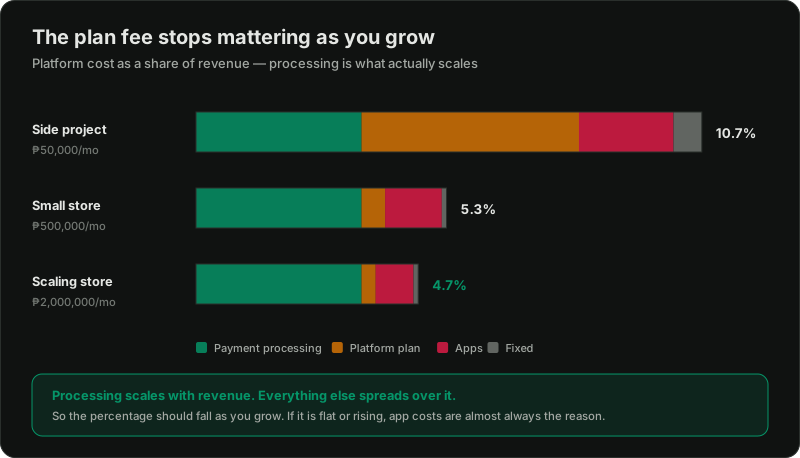
A healthy store's platform percentage falls as it grows, because the fixed layers (plan, domain, theme) spread over more revenue while only processing stays proportional.
If yours is flat or rising as revenue grows, something is wrong, and it's nearly always one of two things: app costs scaling with order volume, or you're on a plan whose transaction fee is now costing you more than the upgrade would.
Three illustrative tiers
Shapes, not quotes. Your numbers will differ.
| Side project | Small store | Scaling store | |
|---|---|---|---|
| Monthly revenue | ₱50,000 | ₱500,000 | ₱2,000,000 |
| Plan | fixed, small | fixed, small | mid or higher |
| Processing (~3.5%) | ₱1,750 | ₱17,500 | ₱70,000 |
| Apps | minimal | moderate | moderate–high |
| Platform as % of revenue | highest | falling | lowest |
The pattern is the point. At the side-project tier the fixed plan fee is a painful share of a small revenue base — which is the real argument for not launching a store until you have some idea how you'll get traffic to it. At the scaling tier the plan fee is a rounding error and processing is essentially the whole cost.
What this means before you start
If you're deciding whether to open a store at all, the useful version of this question is not "can I afford the plan." It's:
"At my expected order volume and average order value, what percentage of revenue goes to the platform, and does my margin survive it?"
If your product margin is 20% and your platform cost lands at 6%, you have 14 points to cover ads, shipping, and everything else. That's tight but workable. If your margin is 12%, paid acquisition is probably not going to work and you should know that before you spend, not after.
Same reasoning as the ceiling maths in profit tracking — the arithmetic is simple; getting honest inputs is the work.
Where I'd actually spend
If the budget is limited, in this order:
1. Nothing beyond the plan and processing, until you have sales. Genuinely. The default theme converts fine.
2. Email, once you have traffic. It's the highest-return spend on this list — flows.
3. A premium theme or light custom work, once you know what your customers actually do.
4. Everything else, last, and only against a specific problem you can name.
The stores that struggle are almost never the ones that under-spent on tooling.
Ready to price it up?
Current plan pricing, fee rates, and what's available in your country are all on Shopify's pricing page. Take the rates from there and run them against your own expected volume using the structure above — that's a fifteen-minute exercise that will tell you more than any article can.
Related reading:

Written by
Vince Servidad
PPC & Creative Strategist
I manage Google Ads and Meta Ads for ecommerce, healthcare, SaaS, events and nonprofits, with creative strategy, Shopify development and conversion tracking.