Shopify
Which Shopify Plan Should You Start On? Do the Crossover Maths
Plan comparisons list features. The decision is almost never about features — it's about the revenue point where a higher plan's lower fees pay for its higher price. That point is calculable in about five minutes.

PPC & Creative Strategist
Every Shopify plan comparison you'll read is a feature table. More staff accounts, more inventory locations, better reporting.
For most stores, none of that decides anything. The decision is arithmetic: each step up costs more per month but charges a lower fee on every sale. There is therefore a revenue level where the higher plan becomes cheaper — not marginally better, actually cheaper — and below that level it's simply worse.
Find that number and the decision makes itself.
Disclosure: the Shopify links here are affiliate links. If you start a store through one I earn a commission at no extra cost to you. I use Shopify for client builds and the recommendation stands on its own.
TL;DR
A note on figures
Plan prices and fee percentages vary by country, change over time, and differ between monthly and annual billing. The numbers below are illustrative — they exist to show the method. Pull your real rates from Shopify's pricing page for your own country, then run the same calculation.
The calculation
Two inputs per plan: the monthly fee and the percentage taken per sale. That second number is the combination of payment processing and — if you're not on Shopify Payments — the additional transaction fee.
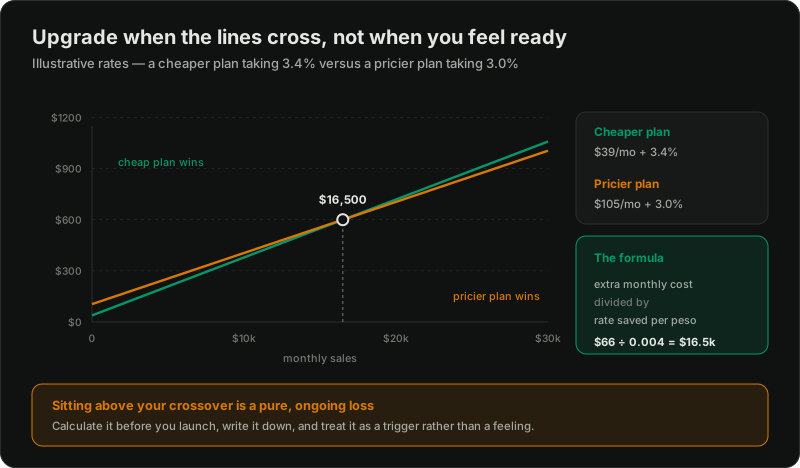
Crossover revenue = (higher plan fee − lower plan fee) ÷ (lower plan rate − higher plan rate)
Worked through with illustrative numbers. Say the cheaper plan costs $39/month and takes 3.4% per sale, and the next plan costs $105/month and takes 3.0%:
So below roughly $16,500/month, the cheaper plan wins. Above it, the pricier plan is genuinely cheaper — you're paying $66 more to save more than $66 in fees.
Note what this is *not*: it is not "upgrade when you feel established." It's a line you cross, and you can calculate it before you launch.
Why this matters far more outside Shopify Payments countries
Here's the part that changes the answer substantially for a lot of sellers, including many in the Philippines.
When you use a third-party gateway rather than Shopify Payments, Shopify charges an additional transaction fee on top of what your gateway charges. That extra fee is a percentage of revenue, and it falls as you move up plans.
That makes the rate difference between plans considerably larger than it is for a store on Shopify Payments — and a larger rate gap means a lower crossover point. Concretely: stores that can't use Shopify Payments should expect to benefit from upgrading at meaningfully lower revenue than the advice written for US stores suggests.
If you're selling in PH, work out which gateway you're realistically using first — the local landscape is here — because it changes the whole calculation.
Where features genuinely do decide it
The maths covers most cases. Some things aren't on the rate card and can override it:
Staff accounts. If you have a team, running out of seats is a real operational constraint.
Shipping rates at checkout. Calculated carrier rates, on higher plans, matter if you ship varied weights or internationally — otherwise you're guessing and eating the difference. See shipping setup.
Inventory locations. Multiple warehouses or a physical shop plus online — this one is binary. You need it or you don't.
Reporting depth. Honestly the weakest reason to upgrade. If you need better analysis, GA4 and a spreadsheet will take you further than the next reporting tier.
B2B functionality. Only on the top tiers, and genuinely transformative if wholesale is a real channel — wholesale on Shopify.
What I'd tell someone starting out
Start on the cheapest plan that works. Almost nobody's first-month revenue is anywhere near a crossover point, and the money is better spent on getting traffic than on features you can't yet use.
Calculate your crossover before you launch and write it down. Then you have a trigger rather than a vague feeling. "When we pass ₱X/month, upgrade" is a decision you've already made.
Recalculate when circumstances change — a new gateway, a new country, a different average order value. The crossover moves.
Don't upgrade for reporting. I've never once seen it pay for itself.
Do upgrade the moment you pass the crossover. Sitting above it is a pure, ongoing, entirely avoidable loss, and it's one of the more common ways I find stores quietly leaking money.
The version nobody says out loud
If you're agonising between plans at launch, the honest answer is that the difference is small relative to the thing that will actually determine whether this works — whether you can acquire customers profitably.
I'd rather someone spend the deliberation time on their acquisition plan and take the cheap plan by default. The crossover will tell you when to move, and by then you'll have real numbers to feed it.
Run it on your own rates
Pull the current plan fees and rates for your country from Shopify's pricing page, drop them into the formula above, and you'll have your crossover in five minutes. If you're not yet trading, use your expected average order value and target monthly orders.
Related reading:

Written by
Vince Servidad
PPC & Creative Strategist
I manage Google Ads and Meta Ads for ecommerce, healthcare, SaaS, events and nonprofits, with creative strategy, Shopify development and conversion tracking.