Google Ads
Google Ad Grants for Nonprofits: $10K/Month Free — Used Properly
Most nonprofits with the grant spend a fraction of it and convert almost none. How to actually use the $10K, when to add a paid account, and how a donation campaign hit 17x return.

PPC & Creative Strategist
Google gives eligible nonprofits $10,000 per month in free search advertising, forever. It's one of the most generous programs in marketing — and most organizations that have it spend a fraction of the budget on queries nobody searches, convert almost none of it, and conclude that "Google ads don't work for nonprofits."
The grant works. It just isn't a smaller version of a paid account — it's a different tool with its own physics. Here's how to use it, and when to run real money alongside it.
TL;DR
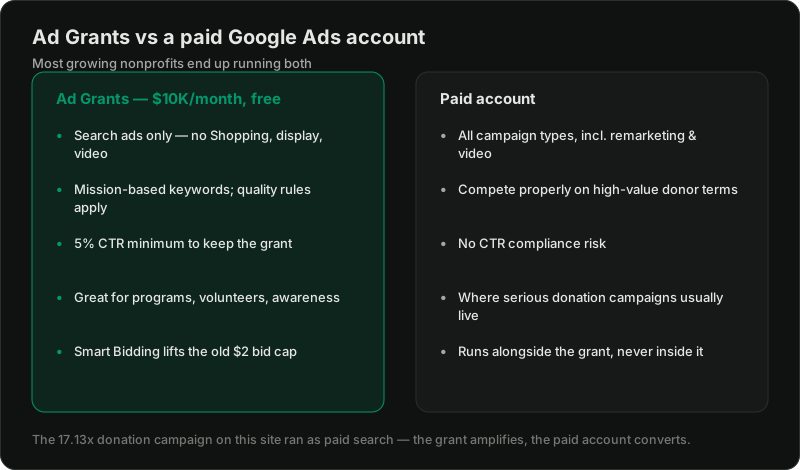
What the grant actually is
Ad Grants gives you search campaigns only — no Shopping, display, video, or remarketing — with rules that exist to keep the free inventory honest:
The historic complaint — a $2.00 bid cap that lost every competitive auction — is gone when you use conversion-based Smart Bidding, which requires working conversion tracking. Most underperforming grant accounts fail exactly here: no meaningful conversions defined, so no Smart Bidding, so the account bids blind and loses.
What the grant is genuinely good at
Point the free $10K at searches where you're the obvious answer:
Define conversions for each: sign-ups, applications, newsletter joins, donation-page visits, and donations themselves. Feed them to Smart Bidding. This alone transforms most grant accounts.
Where the grant runs out — and paid begins
High-intent donation queries ("donate to typhoon relief today") are competitive auctions where grant inventory is structurally disadvantaged, and the grant can't do remarketing, display, or video at all.
So the mature setup can use both accounts for different jobs: the grant can cover eligible mission and research queries, while a paid account enters the standard paid auction. The charity performance snapshot in my case studies is from a paid Google Ads account, not an Ad Grant account. On March 13, 2026, Google Ads reported £828.23 in cost, £14,187.41 in conversion value, and 17.13 conversion value per cost.
One discipline matters doubly for charities: define and track conversion values correctly. Boards ask hard questions about ad spend, and a reported value-to-cost figure is more useful than click volume—but it still needs validation against the charity's own records. The verification steps in the Google Ads audit checklist apply to grant accounts too.
Getting the grant (quick version)
Register with your local TechSoup partner for validation, activate Google for Nonprofits, then apply for Ad Grants inside it. Requirements: registered nonprofit status, a working SSL website with substantive content, and agreement to the program policies. Weeks, not months — and free, at every step. Beware agencies charging setup fees for what is genuinely a form.
Want the grant plus paid set up properly?
Related reading:

Written by
Vince Servidad
PPC & Creative Strategist
I manage Google Ads and Meta Ads for ecommerce, healthcare, SaaS, events and nonprofits, with creative strategy, Shopify development and conversion tracking.