Shopify
Shopify Store Getting Traffic but No Sales? Diagnose It in This Order
Traffic without sales has a short list of causes, and they hide in a specific order: measurement, traffic quality, offer, product page, then checkout. Here's the diagnosis sequence with the numbers that decide each step.

PPC & Creative Strategist
"I'm getting hundreds of visitors a day and almost no orders."
I've heard this from dozens of store owners, and the tempting response is to redesign something — new theme, new ads, a discount popup. Resist it. Traffic-without-sales has a short list of causes, and they can be eliminated in a specific order, cheapest first. Skip the order and you'll spend three weeks redesigning a product page when the real problem was that your traffic never had buying intent.
Here's the sequence I use, with the numbers that decide each step.
TL;DR
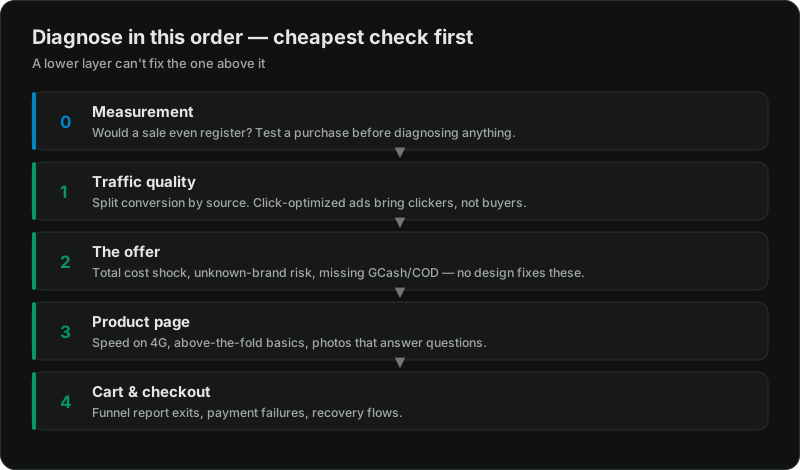
Step 0: Confirm the problem is real
Before diagnosing, size the gap. Store conversion rates vary hugely by price point, market, and traffic mix — a ₱500 impulse product and a ₱30,000 considered purchase should never be judged against the same number. Philippine stores typically land between 0.5% and 2%; anything around 1–1.5% on mixed traffic is normal, not broken. Full context in ecommerce conversion benchmarks.
Two sanity checks:
Step 1: Interrogate the traffic, not the store
The most common cause of traffic-without-sales, especially on newer stores, is that the traffic was never going to buy.
Open GA4 and split conversion rate by source. Then look at:
Where is it from? Viral TikTok traffic, engagement-bait ad clicks, and bought "promotion" traffic can be 90%+ curiosity with zero intent. A thousand visitors from a broad-interest Meta campaign optimized for traffic (link clicks) instead of sales is the classic version — Meta dutifully finds people who click everything and buy nothing. If your ads optimize for clicks, that's likely your whole answer.
Does behavior show intent? Check engagement time and pages per session by source. Sub-10-second average engagement means the visitors bounced on arrival — either wrong audience or a page that didn't match what the ad promised.
Device check. If 90% of traffic is mobile (normal in the Philippines) and your desktop conversion rate is triple your mobile rate, you have a mobile experience problem, not a traffic problem — note it for Step 3.
The decisive test: send a small amount of genuinely high-intent traffic — branded search, or a tightly-targeted campaign optimized for purchases — and watch. If high-intent traffic converts and broad traffic doesn't, your store is fine and your acquisition needs restructuring. That's a Meta account structure question, not a CRO question.
Step 2: The offer — what no design can fix
If qualified traffic still doesn't buy, look at what you're asking them to accept before you look at how the page is styled.
Total cost shock. The number one killer. A ₱1,200 product with ₱250 shipping revealed at checkout reads as a 20% price hike at the moment of maximum doubt. Test free-shipping thresholds or build shipping into the price — and say so on the product page.
Price vs perceived risk. New store, unknown brand, no reviews, and a price at or above what Lazada/Shopee charge for a comparable item: the visitor's rational move is to leave. You don't need to be cheapest — you need a visible reason you're worth the difference, and proof someone real has bought before. Reviews are the highest-leverage trust asset a new store can build; see collecting and displaying reviews.
Payment methods. In the Philippines, no GCash/Maya and no COD option excludes a large share of willing buyers instantly. Setup options: Shopify payments in the Philippines.
The honest question. Would YOU buy this product, at this price, from a store you'd never heard of? If the answer needs talking yourself into it, the constraint is the offer.
Step 3: The product page
Now — and only now — the page itself. The highest-impact checks, in order:
Speed on a real phone. Load your product page on 4G, not office WiFi. Over ~4 seconds and you're losing buyers before the page exists. Fixes in the Shopify speed guide.
Above the fold on mobile: product photo, clear name, price, shipping signal, and a visible add-to-cart button — without scrolling. Open yours and count what's missing.
Photos that answer questions: scale, texture, in-use context, what's included. One studio shot on white is a catalog entry, not a sales page.
Copy that sells the outcome and preempts the objections: sizing, materials, delivery time, returns. The full checklist lives in Shopify product page best practices.
Message match. The ad promised something specific; the page must repeat it immediately. Ad-to-page mismatch quietly murders conversion on stores whose pages look great in isolation.
Step 4: Cart and checkout
Least common culprit for a zero-sales store, but real money for a low-sales one. Check the Shopify funnel report (Online Store → Analytics): where exactly do people exit?
The compounding trap: fixing the wrong layer
Each layer only matters if the layers above it are sound. A beautiful product page can't rescue clickbait traffic. A checkout optimization sprint is pointless while shipping costs ambush people. This is why "we tried CRO and nothing changed" usually means the diagnosis order was wrong, not that optimization doesn't work.
Related reading:

Written by
Vince Servidad
PPC & Creative Strategist
I manage Google Ads and Meta Ads for ecommerce, healthcare, SaaS, events and nonprofits, with creative strategy, Shopify development and conversion tracking.