Google Ads
Keyword Research for Service Businesses (How to Find Hire-Intent Searches)
For service businesses, the whole game is separating people ready to hire from people just researching — and from job-seekers wasting your budget. A step-by-step method to sort every keyword by intent.

PPC & Creative Strategist
Keyword research for a service business is not about finding the most-searched terms. It's about separating three groups who use similar words: people ready to hire, people just researching, and people who will never be customers (job-seekers, students, DIYers). Bid on the wrong group and you'll spend a fortune looking busy while your calendar stays empty.
Here's the method I use to build a service-business keyword list that spends on buyers.
TL;DR
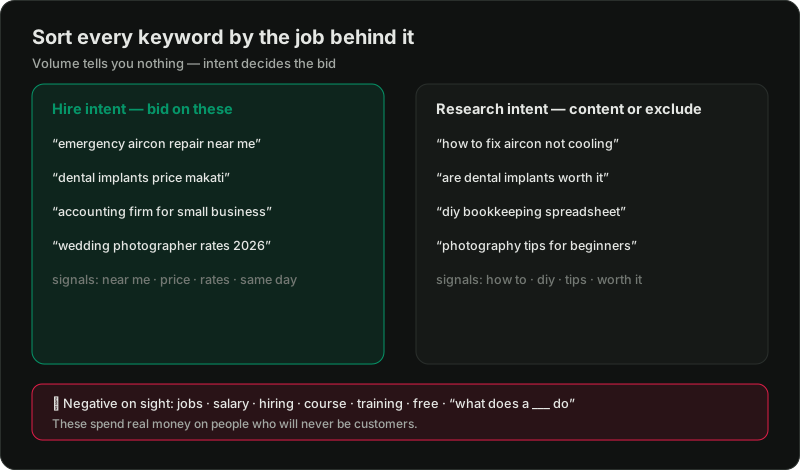
Why intent beats volume for services
An ecommerce store can profit from broad interest. A service business usually can't — one job is worth thousands, but you can only take so many, and each wasted click is expensive. A term with 50 searches a month where every searcher is ready to hire is worth far more than one with 5,000 searches that are mostly curiosity. So the sorting matters more than the discovery.
Step 1: Generate the raw list
Pull candidates from:
Don't filter yet. Get everything into one list.
Step 2: Sort by intent, not volume
Now the real work — put every keyword into one of three buckets.
Bucket 1 — Hire intent (bid on these):
These are where budget belongs. Tight ad groups, matching landing pages, aggressive bids.
Bucket 2 — Research intent (content or exclude):
Real future customers, but not ready. Either exclude them from paid search, or serve a cheap content page and retarget — never pay hire-intent CPCs for reading-intent clicks.
Bucket 3 — Negative on sight (block these):
Build these into a shared negative keyword list immediately. This single step saves more wasted spend than any bid strategy. The full method is in negative keywords mastery.
Step 3: Add location logic
Service keywords are geographic. Someone searching "plumber Quezon City" won't hire one in Cebu. Structure by:
The clinic version of this, with policy nuances, is in Google Ads for clinics.
Step 4: Map keywords to matching pages
A hire-intent keyword deserves a page that repeats its promise. "Emergency aircon repair Makati" should not land on a generic homepage listing ten services — it should hit a page about emergency aircon repair, in Makati, with a phone number above the fold. Mismatched pages waste the click you just paid for; the anatomy of a page that converts is in the lead-gen landing page checklist.
Step 5: Let real search terms refine the list
Your keyword list is a hypothesis. Once ads run, the search terms report tells you the truth — which of your keywords trigger buyer searches versus junk you didn't anticipate. Reviewing it weekly, adding negatives and promoting winners, is the core of the weekly PPC routine. Keyword research isn't a one-time project; it's a loop.
Want your keyword strategy built around buyers?
Related reading:

Written by
Vince Servidad
PPC & Creative Strategist
I manage Google Ads and Meta Ads for ecommerce, healthcare, SaaS, events and nonprofits, with creative strategy, Shopify development and conversion tracking.