Google Ads
Call Tracking for PPC: Measuring the Conversions Your Forms Never See
For service businesses, a large share of paid enquiries arrive by phone — and most accounts can't see any of them. Here's how to track calls properly, and how to avoid optimising toward calls that were never going to buy.

PPC & Creative Strategist
Plenty of service businesses run paid ads where most enquiries arrive by phone, and the ad account can only see form submissions. Then someone concludes the campaign is expensive, cuts the budget, and enquiry volume drops for reasons nobody connects back.
If a meaningful share of your customers call rather than fill in a form, call tracking isn't optional — it's the difference between managing on half the data and managing on all of it.
TL;DR
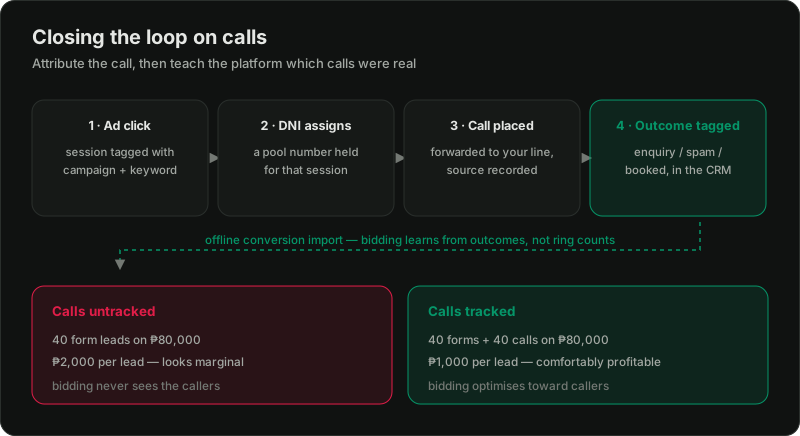
Why untracked calls distort everything
Say a campaign generates 40 form leads and 40 calls a month on ₱80,000 of spend.
The damage isn't only the misread. It's that Smart Bidding optimises toward what it can see. Fed only form fills, it will find you more form-fillers and quietly de-prioritise the audiences, keywords, and placements that drive callers — often the highest-intent traffic you have, because people who call are usually closer to buying.
The three levels
Level 1 — Google Ads call tracking (free). Call extensions/assets and call-only ads can be tracked natively, and Google forwards through its own number. Covers calls that start *from the ad*. Doesn't cover someone who clicked through and called the number on your site — usually the bigger share.
Level 2 — Google forwarding number on your site (free). Google can swap the number on your website for a forwarding number for ad visitors, attributing website calls to campaigns. Good coverage for Google Ads at zero cost. Limited: Google traffic only, and limited keyword-level detail.
Level 3 — A call tracking platform with DNI (paid). A pool of numbers, dynamically assigned per session. Attributes calls across *all* channels — Google, Meta, organic, direct — down to keyword and landing page, with recordings and outcome tagging. This is what you want if calls are a primary channel.
Most service businesses should be at level 2 minimum. If phone is your main enquiry route, level 3 pays for itself quickly.
How DNI actually works
A pool of tracking numbers sits in front of your real line. When a visitor lands, a script assigns them a number from the pool and holds it for their session. When they call it, the platform records which session, source, campaign, and keyword that number was assigned to, then forwards to your real line.
Two practical constraints:
Track *qualified* calls, not all calls
This is where most implementations go wrong. Counting every call as a conversion means you're optimising toward wrong numbers, suppliers, existing customers checking an order, and hang-ups.
The crude filter: count calls over a duration threshold — 60 or 90 seconds. Fast, free, and roughly separates real enquiries from noise. Start here.
The good version: tag the outcome. Your team marks each call as enquiry / existing customer / spam / booked. Feed *that* back to the platforms rather than raw call counts. Now bidding optimises toward calls that became customers, which is the same principle as offline conversion tracking — and the mechanism is literally the same import.
For a clinic, that's the difference between paying for appointments and paying for ringing phones — the economics of which are in cost per patient.
Watch the privacy side
Call tracking collects phone numbers, often recordings, and sometimes health or financial information depending on your sector.
What to do this week
1. Find out what share of enquiries arrive by phone. Ask whoever answers. If it's over ~20%, this matters.
2. Turn on Google forwarding numbers for website calls — free, same-day.
3. Set a qualified-call definition — start with duration, move to outcome tagging.
4. Make the phone number prominent on mobile and click-to-call. On a phone, a tappable number often outperforms a form. Relevant to the lead-gen landing page checklist.
5. Feed outcomes back once you have a month of tagged data.
Want calls properly wired in?
The setup is straightforward; the judgement is in what counts as a conversion and how the outcome gets back to the platforms. Getting that wrong just moves the optimisation problem rather than solving it.
Related reading:

Written by
Vince Servidad
PPC & Creative Strategist
I manage Google Ads and Meta Ads for ecommerce, healthcare, SaaS, events and nonprofits, with creative strategy, Shopify development and conversion tracking.