Healthcare
Healthcare Conversion Tracking Without Leaking Patient Data
Most clinic tracking setups quietly send condition data to Google and Meta through page URLs and event names. Here's what actually leaks, why it's a policy and legal problem, and how to measure bookings properly instead.

PPC & Creative Strategist
Almost every clinic tracking setup I audit is leaking something. Not through a dramatic breach — through a URL.
The booking page is /book/std-testing. The thank-you page is /confirmed?service=fertility-consult&email=maria@example.com. Analytics records the page path. The conversion tag sends the URL. Now an ad platform holds a record connecting an identifiable person to a health service, and you didn't decide to do that — your URL structure did.
This is fixable, and fixing it doesn't cost you measurement. Here's the durable version.
TL;DR
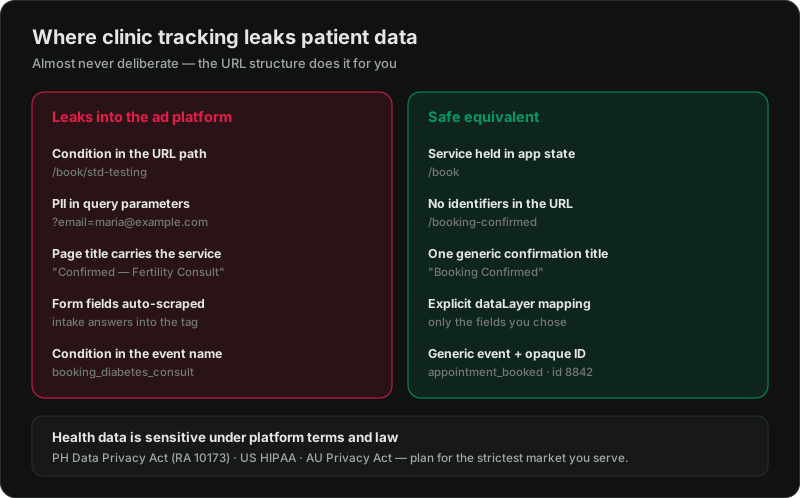
What actually leaks, in order of how often I find it
1. Condition in the URL path. /services/hiv-testing/book tells anyone reading the page path what that person is doing. GA4 records page paths by default. Ad platform tags read the URL.
2. PII in query parameters. ?email=, ?phone=, ?patient_id=, ?name= on a confirmation redirect. This is the worst one, because it lands in browser history, server logs, and analytics referrer data in plain text.
3. Page titles. "Booking Confirmed — Fertility Consultation | Clinic" gets sent as the page title to GA4 and read by tag templates.
4. Form field auto-collection. Some tag setups scrape visible form fields to populate enhanced conversions. On a medical intake form, that can pull far more than an email.
5. Event names and parameters. A custom event called booking_diabetes_consult is health data with extra steps.
6. Session recording and heatmap tools. These capture form contents unless you explicitly mask them. On a medical intake form, that's a recording of a patient typing their symptoms.
Why it matters beyond principle
Platform terms. Google's policies prohibit sending personally identifiable information to Google, and its personalised advertising policy treats health as a sensitive category — you cannot build remarketing audiences around health conditions or treatments. Meta's business tools terms prohibit sending sensitive health information through its tools. Violations put the ad account at risk, not just the data.
Law, depending on where your patients are. In the Philippines, the Data Privacy Act of 2012 (RA 10173) classes health information as sensitive personal information with stricter processing conditions and real penalties. If you serve US patients, HIPAA may apply, and US regulators have taken direct action against health providers over exactly this — tracking pixels on patient-facing pages. In Australia, health information is sensitive information under the Privacy Act. If you have patients in more than one of those, plan for the strictest.
I'm a performance marketer, not your lawyer — for a regulated practice, get the specifics reviewed by someone qualified in your jurisdiction. What follows is the implementation side.
The fix: measure the event, not the person
Sanitise the URLs
Restructure so the sensitive detail isn't in the path a tag can read.
/book with the service passed in application state or a POST body, not the path or query string./booking-confirmed for every service, not one per service.Never put an email, phone number, or patient identifier in a URL. If you need to pass the customer data for enhanced conversions, expose it through the dataLayer or server-rendered state instead — the same point I make in the enhanced conversions guide.
Make event names generic
One event: appointment_booked. Not appointment_booked_dermatology.
If you need service-level reporting — and you should, because the economics differ per service — keep that split in your own booking system or CRM, where it belongs, and report on it there. The ad platform needs to know a booking happened and what it's worth. It does not need to know what it was for.
Send a booking ID, not an identity
Your conversion should carry an opaque booking_id. That ID means nothing to anyone outside your systems, but it lets you join platform data to your booking records for reporting and for offline conversion imports.
This is what makes proper measurement possible without the leak: the platform learns "conversion 8842 was worth ₱X," and only your CRM knows who that was.
Move the conversion server-side
Server-side tagging gives you a control point the browser never offers — you decide exactly which fields leave your infrastructure. It's also more resilient to cookie loss and ad blockers, which matters for a category where reported conversions routinely undercount.
For clinics this is the single highest-value tracking upgrade: you get better data *and* a smaller surface area for mistakes.
Mask everything in your session tools
Any recording or heatmap tool: turn on input masking globally, then verify it on your actual intake form. Default settings usually mask password fields and nothing else.
Measure the booked appointment, not the form fill
The most common measurement error in clinic accounts has nothing to do with privacy — it's optimising toward enquiries instead of appointments.
Enquiry volume is easy to grow and easy to grow *badly*. Half the enquiries never book. If the platform optimises on form fills, it will find you more form fills, cheerfully, including the ones that never turn into patients.
The sequence that works:
1. Track appointment_booked — confirmed in the booking system, not the form submit.
2. Where booking happens by phone or on a later day, feed the outcome back with offline conversion imports, using your booking ID. The mechanics are in offline conversion tracking.
3. Attach a value. Not the consultation fee — the realistic value of the patient. A first dermatology consult that typically leads to a treatment course is worth far more than the consult price, which is the calculation in cost per patient.
A short verification pass
Run this before you trust any clinic setup:
If all five come back clean, your setup is in better shape than most.
Want this audited properly?
Clinic tracking has to satisfy two things at once: accurate enough to spend money on, clean enough to defend. Most setups I see are neither, and the owner has no idea because nothing visibly breaks.
Related reading:

Written by
Vince Servidad
PPC & Creative Strategist
I manage Google Ads and Meta Ads for ecommerce, healthcare, SaaS, events and nonprofits, with creative strategy, Shopify development and conversion tracking.