Google Ads
Consent Mode: What It Does to Your Conversion Data
Consent mode changes what your tags send, what Google models, and what you can build audiences from. Most implementations are quietly broken in one of four ways — here's how to tell whether yours is one of them.

PPC & Creative Strategist
Consent mode is where measurement meets law, which is why so many implementations are half-finished. Someone installs a cookie banner, ticks a box in the tag manager, and nobody checks what actually happens to the data.
The result is usually one of two failure modes: tags that fire regardless of what the visitor chose (a compliance problem), or tags that never fire at all (a measurement problem that quietly starves your bidding). Both are common. Here's the model, and how to check which one you have.
TL;DR
The mental model
Consent mode defines a set of consent states — the two that matter most for advertising being analytics_storage and ad_storage, plus ad_user_data and ad_personalization.
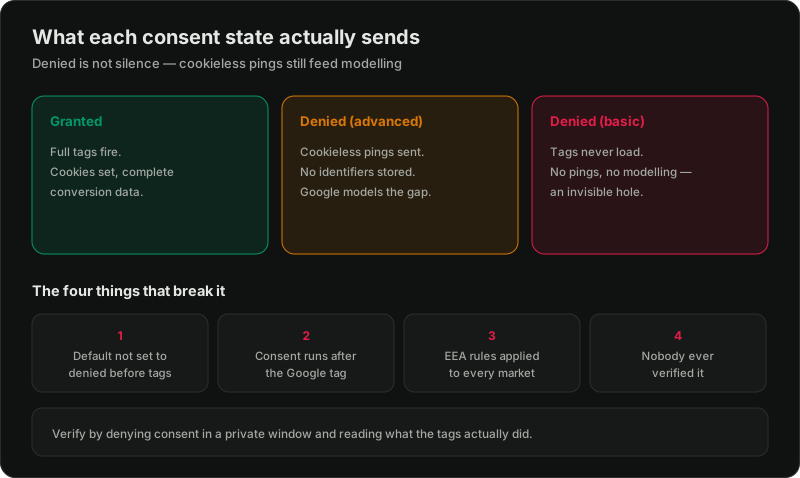
Your banner sets these to granted or denied. Tags read them and change behaviour:
Those pings are the point. They let Google model conversions it can't directly observe, so your reported totals stay closer to reality than they would if the tag simply went silent.
Basic vs advanced, and why it matters
Basic blocks tags from loading at all until consent is granted. Simple, and it loses the most data — no pings, no modelling, an invisible hole.
Advanced loads tags in a restricted state from the start. Denied users produce cookieless pings, which feed modelling. More data, more accurate reporting, more setup care.
If you have meaningful traffic from consent-required regions, advanced is usually the right call. The trade-off is that it demands correct configuration — which is where most implementations fall down.
The four things that break it
1. The wrong default. Defaults must be set to denied *before* any tag fires, for regions that require it. Set them after, or not at all, and you're firing unconsented tags — the compliance failure. Set denied globally when you don't need to, and you throw away data unnecessarily.
2. Timing. The consent default has to run before the Google tag. In a tag manager that means a dedicated consent initialisation trigger, not a normal page-view trigger. Race conditions here produce inconsistent, hard-to-diagnose behaviour.
3. Region scope applied too broadly. Consent requirements differ by market. Applying EEA-strict defaults to every visitor worldwide is a common over-correction that costs real conversion data in markets that never required it. Scope by region.
4. Nobody ever verified it. This is the big one. The banner looks fine, so it's assumed to work. Almost nobody loads the site, denies consent, and checks what the tags actually did.
How to verify yours in ten minutes
1. Open the site in a clean private window and deny everything.
2. In tag manager preview or the browser network tab, confirm tags fire in a restricted state (advanced) or not at all (basic) — and that no advertising cookie is written.
3. Repeat, granting consent. Confirm the state flips to granted and full tags fire.
4. Check the consent state is correct before the first tag, not after.
5. In Google Ads and GA4, look for modelled-conversion indicators. If you're in a consent-required region with real denial rates and see zero modelling, your pings probably aren't being sent.
If step 2 shows advertising cookies written after a denial, stop and fix that first — that's the one with legal consequences.
What it does to your numbers
Expect reported conversions to drop when consent mode is implemented properly, especially with high denial rates. That's not a bug; you were previously counting things you shouldn't have.
Two practical consequences:
And it stacks with everything else that makes platform numbers disagree — the full picture is in why the numbers don't match.
Where server-side fits
Server-side tagging does not replace consent mode and does not let you track people who declined. It changes where tags execute, not whether you have permission. The consent signal still has to travel to the server container and still has to be honoured there.
If anything, moving server-side makes verification more important, because the enforcement point is now somewhere you can't see in the browser. More on the trade-offs in server-side tagging.
The honest position
I'm a performance marketer, not a lawyer. What regions require consent, and what your banner must say, is a legal question for your jurisdiction and your counsel. What I can tell you is whether the implementation does what it claims to — and in most accounts I audit, it doesn't.
Related reading:

Written by
Vince Servidad
PPC & Creative Strategist
I manage Google Ads and Meta Ads for ecommerce, healthcare, SaaS, events and nonprofits, with creative strategy, Shopify development and conversion tracking.